
Download ElevenLabs – AI dubbing tool for multilingual video translation
Overview
ElevenLabs — Dubbing is a freemium, AI‑powered web app that lets you automatically dub any video into a new language. By simply uploading a clip or pasting a YouTube/X (formerly Twitter) link, the platform extracts the original audio, translates it into one of 29 target languages, and then generates a synthetic voice track that syncs with the original video. The finished video can be streamed instantly or downloaded for offline use.
Designed for creators, marketers, educators, and casual viewers, ElevenLabs removes the need for manual subtitle creation or hiring voice actors. The service supports up to 57 source languages, offers speaker‑separation for multi‑person dialogues, and even lets premium users select the output resolution. While AI‑driven dubbing still faces challenges such as occasional mistranslations or background‑noise interference, the tool’s ease of use, broad language coverage, and quick turnaround make it a compelling addition to any video‑localisation workflow.
Key Features and Benefits
- Automatic language detection: The engine can recognize up to 57 source languages without manual input.
- 29 target languages: From English and Spanish to Korean and Swahili, you can reach a truly global audience.
- One‑click video import: Paste a YouTube or X link, or upload a local file directly from your device.
- Speaker separation: Choose the number of speakers to improve voice‑over accuracy for overlapping dialogue.
- Resolution control (Premium): Select HD, Full HD, or 4K output for professional‑grade videos.
- Fast processing: Typical videos under 10 minutes finish in a few minutes; longer clips scale proportionally.
- Secure cloud processing: Files are encrypted during upload, processed on isolated servers, and deleted after download.
- Freemium model: Free tier offers up to 2,000 characters per minute of audio, while paid plans unlock higher limits and priority queues.
- Cross‑platform accessibility: As a browser‑based service, it works on Windows, macOS, Linux, Android, and iOS without additional software.
- Export options: Download the dubbed video in MP4 format or stream it directly from ElevenLabs’ player.
Beyond the raw feature list, ElevenLabs provides several strategic advantages. First, it shortens the localisation timeline dramatically—what used to require days of translation, voice‑over recording, and editing can now be completed in minutes. Second, the AI voice synthesis mimics natural intonation, reducing the “robotic” feel that older text‑to‑speech tools often exhibit. Third, the platform’s pricing structure is transparent: a free tier for occasional users and tiered subscriptions for creators who need higher character limits, batch processing, or priority support. Finally, the ability to dub directly from social‑media URLs eliminates the extra step of downloading the source video, saving both bandwidth and storage space.
Installation, Usage, and Compatibility
Getting Started – No Installation Required
ElevenLabs — Dubbing is a pure web application, so there is no traditional installation process. Simply navigate to elevenlabs.com/dubbing using a modern browser (Chrome, Edge, Firefox, or Safari). The site automatically detects your operating system and adjusts the UI for optimal performance on desktop and mobile devices.
Step‑by‑Step Workflow
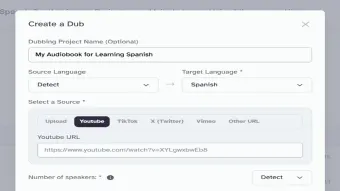
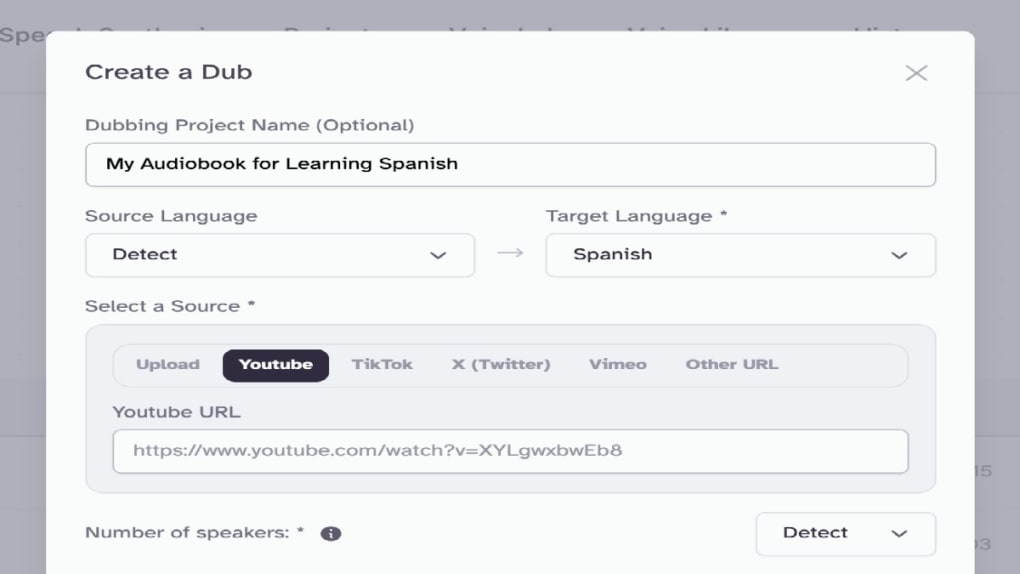
- Choose your source: Paste a YouTube or X video URL, or click “Upload” to select a local file (MP4, MOV, AVI, or WebM).
- Select languages: The system will auto‑detect the source language. Pick a target language from the dropdown menu (29 options).
- Configure speakers: If your video contains multiple speakers, indicate the number to enable speaker separation. This improves voice‑over timing for overlapping speech.
- Advanced settings (optional): Premium users can set output resolution, choose a specific AI voice model, and adjust playback speed.
- Start dubbing: Click “Process”. The platform queues your job, shows an estimated completion time, and provides a progress bar.
- Review and download: Once processing finishes, you can preview the dubbed video in the embedded player. If satisfied, hit “Download” to save the MP4 file, or copy the shareable link.
System Requirements and Operating Systems
Because ElevenLabs runs entirely in the cloud, it is compatible with any device that has an up‑to‑date web browser and a stable internet connection. Supported operating systems include:
- Windows 10/11
- macOS Monterey and later
- Linux distributions with recent Chromium/Firefox
- Android 8.0+ (Chrome or Firefox)
- iOS 13+ (Safari or Chrome)
The platform requires at least 4 GB of RAM for smooth playback of the preview player, though the actual dubbing process runs on remote servers, so local hardware limitations rarely affect performance. For the best experience, use a broadband connection of at least 10 Mbps, especially when working with high‑resolution video files.
Pros, Cons, and Expert Review
Pros
- Fast, fully automated dubbing without manual voice‑over recording.
- Supports a wide range of source and target languages, covering most global markets.
- Speaker separation improves accuracy for multi‑person dialogues.
- Browser‑based, no installation, works on all major OS platforms.
- Free tier allows testing before committing to a paid plan.
- Secure, encrypted processing and automatic deletion of source files after download.
- Premium resolution options make it suitable for professional productions.
Cons
- AI voice may still sound slightly synthetic for certain languages.
- Character limit of 2,000 per minute on the free tier can restrict longer videos.
- Background noise in the original audio can affect translation accuracy.
- Occasional mistranslations for idiomatic expressions or niche terminology.
- Processing time increases noticeably for videos longer than 30 minutes.
Overall Verdict: ElevenLabs — Dubbing delivers a powerful, user‑friendly solution for rapid video localisation. While the AI‑generated voices are not yet a perfect substitute for professional talent, the speed, language breadth, and zero‑installation workflow make it an excellent choice for creators on a budget or anyone needing quick multilingual content. With a solid free tier and reasonably priced premium plans, the service offers good value and positions itself as a leader in the emerging AI dubbing market.
Frequently Asked Questions
Can I dub videos directly from YouTube without downloading them?
Yes. ElevenLabs — Dubbing accepts YouTube and X (Twitter) URLs. The platform fetches the video, extracts the audio, and processes the dub entirely in the cloud, so you never need to download the source file first.
What is the maximum video length I can process on the free plan?
The free tier allows up to 2,000 characters per minute of audio. This translates to roughly 3‑4 minutes of clear speech per minute of video. For longer content you’ll need a paid subscription.
How accurate is the language detection?
ElevenLabs uses a deep‑learning model trained on over 57 languages, achieving >95 % accuracy for most major languages. For rare dialects or heavily accented speech, you can manually override the detected source language.
Can I choose a specific AI voice for the dubbing?
Premium users can select from a library of AI voice profiles, including gender, age, and regional accent options. The free tier uses a default neutral voice for each language.
Is my uploaded video stored permanently on ElevenLabs’ servers?
No. Files are encrypted during upload, processed on isolated servers, and automatically deleted within 24 hours after the user downloads the final output, ensuring privacy and security.
Conclusion and Call to Action
If you need to reach a global audience quickly, ElevenLabs — Dubbing offers one of the most streamlined AI dubbing experiences available today. Its ability to work directly from online video URLs, support for dozens of languages, and browser‑based interface remove many of the traditional barriers to video localisation. While AI‑generated voices still have room for improvement, the tool’s speed, affordability, and secure cloud processing make it a valuable addition to any creator’s toolkit. Ready to give your videos a new voice? Download ElevenLabs now and start dubbing for free—upgrade to a premium plan whenever you need higher limits or HD output.



.png)



